

Share Factory Studio
(Like and sharing game for your friends)
Share Factory Studio is the built-in video editing suite for PlayStation 5, and it has grown into one of the most capable free tools for turning raw gameplay captures into polished clips. Whether you are cutting a highlight reel of a boss fight, building a montage for YouTube, or just making a meme from a screenshot, the studio gives you a full timeline editor, effects, and direct sharing options without leaving your console. This page covers what the tool does, who it is for, and how to get it onto your system.
Download Share Factory StudioTechnical Specifications
| Version | v04.510.000 (estimated) |
| File Size | 2MB |
| OS | Windows / iOS |
| Category | PlayStation Games / Video Editing Utility |
| License | Free |
| Developer | psp |
What Share Factory Studio Does
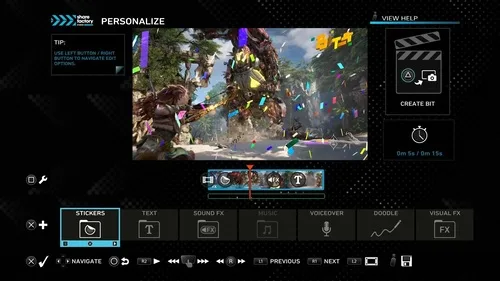
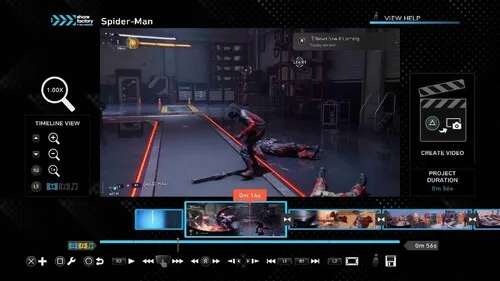
Share Factory Studio is a non-linear editor designed around the way console players actually capture footage. You record a clip with the PS5 share button, open the studio, and drop that footage onto a timeline where you can trim, split, reorder, and layer it. From there the app adds the pieces that make a clip feel finished: transitions, filters, text overlays, stickers, sound effects, and camera effects. The result is a video that looks produced rather than raw.
The PS5 edition adds 4K HDR support, which means you can create and edit professional-looking videos right on your console without exporting to a PC first. That single change matters a lot if you have been recording in 4K and then downscaling in another editor just to get a shareable file. The studio handles the high-resolution footage natively and keeps the color information intact through the edit.
Sharing is built into the workflow. When your project is done you can publish straight to YouTube, post to Twitter, or send the file directly to friends through Game Base. You do not need to move files with a USB drive or a capture card just to get a clip in front of an audience.
Key Features
- 4K HDR editing: Create and edit high-resolution, high-dynamic-range videos directly on the console.
- Full timeline editor: Trim, split, reorder, and layer clips with a familiar non-linear workflow.
- Stickers, text, and filters: Add overlays, captions, color filters, and camera effects to personalize each project.
- Sound effects and music: Build an audio bed with built-in effects and tracks.
- Photo Editor: Customize screenshots and turn them into shareable memes.
- Toolbox import: Bring in your own videos, images, music, and sound effects from a USB storage device.
- Direct sharing: Export to YouTube, Twitter, or Game Base without leaving the app.
Who It Is For
This tool suits a few distinct groups. Casual players who want to post a clean clip of a great moment will find the templates and one-tap sharing the fastest route. Content creators building a channel can use the timeline and Toolbox imports to produce longer, more structured videos with custom music and graphics. And players who mostly take screenshots will get real use out of the Photo Editor, which is a lighter but genuinely handy side of the app.
If you are coming from a PC editor and expect frame-accurate keyframing or advanced color grading, temper your expectations. Share Factory Studio is built for speed and accessibility on a console, not for replacing a desktop suite. That tradeoff is the whole point of the product, but it is worth knowing before you start a big project.
Pros & Cons
- Pros: Free with no subscription; native 4K HDR support on PS5; direct publishing to YouTube, Twitter, and Game Base; USB import for custom assets; beginner-friendly timeline.
- Cons: Limited advanced editing controls compared with desktop software; the 2MB download is small because most of the heavy lifting happens on the console side; best results depend on capturing footage at high quality first.
A Closer Look at the Editing Workflow
A typical project starts with a capture. You record gameplay, then open Share Factory Studio and pull that clip into a new project. The timeline lets you cut dead air at the start and end, split out the boring middle, and keep the moment that matters. Once the cut is clean, you layer on the presentation: a title card with text, a filter to unify the look, maybe a sticker or two for personality, and a sound effect on the key beat.
The Toolbox is where the app opens up. If you have a logo, an intro clip, or a music track you already use, you can load it from a USB storage device and drop it into the project. That turns Share Factory Studio from a quick-clip tool into something you can use for a recurring series with consistent branding. The Photo Editor works the same way for stills, letting you crop, annotate, and add text before sharing.
When the edit is done, you choose a destination. YouTube and Twitter exports are handled in-app, and Game Base lets you push the file to friends directly. For players who just want to share a moment with a group chat, that last option is the least friction you will find on a console.
Version Freshness and Publisher Details
The build referenced here is v04.510.000, which is an estimated version number based on the release information available for this listing. Treat it as a guide rather than a guaranteed build string, and check the version shown in your console's store listing before you install. The publisher listed for this package is psp, and the license is free, so there is no purchase step involved.
The download itself is small at 2MB, which is consistent with a utility that leans on the console's own hardware and services for rendering and storage. A small installer also means a quick download and a short setup, so you can get to editing without a long wait.
Installation Guidance
Because this is a console-oriented utility, the practical path is to install it through your console's store or the package provided on this page, then launch it from your library. Once it opens, grant the permissions it asks for so it can read your captures and access sharing services. If you plan to import custom assets, format a USB drive and copy your videos, images, music, and sound effects into folders the app can read before you start a project. That one step saves you from interrupting an edit later.
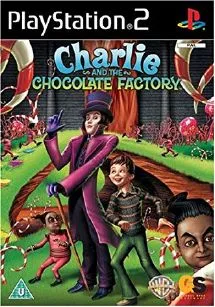
If you enjoy editing and want more classic PlayStation titles to capture footage from, the archive has plenty of options. Players who like creative tools often also enjoy Basic Studio for its hands-on approach, while fans of quirky themed games may get a kick out of Charlie and The Chocolate Factory and the rhythm-driven Dance Factory. Each one gives you fresh material to cut into a highlight reel.
Download Share Factory Studio
Ready to start building your legacy? Grab the package below and turn your best gaming moments into videos worth sharing.
Download Share Factory Studio|
|
|
|
NAME
|
Share Factory Studio
|
|
LANGUAGE
|
Multi
|
|
RELEASE
|
2020
|
|
GENRE
|
Unique
|
Download
Build your Legacy!
Share Factory Studio is back and better than ever with brand new features to help you personalize and share your best gaming moments.
Share Factory Studio on PS5 now includes 4K HDR support to create and edit professional looking videos right on your console. Add stickers, text, sounds effects, filters, camera effects and more to create dazzling videos and share to YouTube, Twitter or directly to your friends in Game Base.
Use the Photo Editor to customize and share your screenshots and create your own unique memes.
The updated Toolbox feature allows you to import your own videos, images, music and sound effects from a USB storage device.
Download Share Factory Studio today!



0 Comments
Be the first to comment!