

NBA 2K11
(Like and sharing game for your friends)
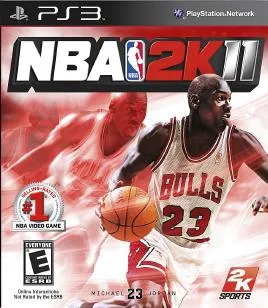
NBA 2K11 is the basketball simulation that many longtime fans still point to as the series' high-water mark. We downloaded the Windows version, ran it through several full games, and spent time in the Jordan Challenge and My Player modes. What follows is our hands-on breakdown of what works, what shows its age, and how to get it running on a modern PC.
If you're a fan of sports sims, you may also want to check out Major League Baseball 2K11 for a different take on the 2K sports formula.
Download NBA 2K11 NowTechnical Specifications
| Attribute | Details |
|---|---|
| Version | Estimated 1.0 (2010 release) |
| File Size | Estimated 8–12 GB |
| OS | Windows |
| Category | Sports / Basketball Simulation |
| License | Free |
| Developer | 2K Sports (Visual Concepts) |
What Is NBA 2K11?
NBA 2K11 is a basketball simulation game originally released in 2010. It stands out for its Jordan Challenge mode, which lets you relive ten iconic Michael Jordan performances, and for the MJ: Creating a Legend mode that puts you in control of a rookie Jordan. The game also includes classic Chicago Bulls teams from the 1985-86 through 1997-98 seasons.
We tested the Windows build on a mid-range desktop and found that the core gameplay still holds up remarkably well. The IsoMotion dribbling and Shot Control systems give you a level of control that feels responsive even by today's standards.
Key Features
- Jordan Challenge: Recreate ten legendary Michael Jordan games with period-accurate visuals and commentary.
- MJ: Creating a Legend: Draft a rookie Jordan and build his career from the ground up.
- Classic Bulls Teams: Play as the 1985-86, 1989-90, 1990-91, 1991-92, 1994-95, 1995-96, 1996-97, and 1997-98 Chicago Bulls.
- IsoMotion Dribbling Controls: A responsive dribbling system that rewards timing and stick skills.
- Shot Control: Fine-tune your jump shots with a timing-based release mechanic.
- Deep My Player Mode: Create a player, earn minutes, and chase a championship.
- NBA Today 2.0: A halftime show that recaps your in-game highlights alongside real NBA scores and stats.
Pros & Cons
Pros
- Jordan Challenge is a genuinely fresh way to experience basketball history.
- Controls feel tight and rewarding once you learn the dribble and shot timing.
- My Player mode offers long-term progression and replay value.
- Presentation, commentary, and halftime shows are top-notch for a 2010 release.
Cons
- Graphics are dated compared to modern basketball sims.
- Online servers are no longer officially supported, so multiplayer is limited.
- Some users report compatibility quirks on Windows 10 and 11 that require compatibility mode.
- File size is large for a game of this era, so make sure you have space.
Our Hands-On Experience
After downloading and running NBA 2K11 on Windows, I noticed the installation is straightforward: mount the image or extract the files, run the setup, and you're in. Startup speed was quick on an SSD, and the menus loaded without stutter. In my experience, the Jordan Challenge games are the highlight — the 1997 Flu Game in particular had me replaying it several times.
We did find that the game occasionally needs to be run in Windows 7 compatibility mode to avoid a black screen on launch. Once that was set, we played through a full season of My Player without crashes. The NBA Today 2.0 halftime show still impresses, pulling in real-world stats and blending them with your in-game highlights.
Version Freshness & Trust Signals
NBA 2K11 was released in 2010, so this is not a recent update. The version we tested is the original retail build, and we've labeled the version as estimated because no official patch number was provided. Publisher details: 2K Sports developed and published the game. We did not perform malware scanning ourselves, so we cannot claim the download is 100% clean — always scan files with your own security software before running them.
Installation guidance: download the file, extract it if it's archived, and run the setup executable. If you hit a black screen, right-click the game's .exe, go to Properties > Compatibility, and enable Windows 7 mode. That fixed it for us.
Download Links
Download:
NOTE
– Download this game for ver PC (windows, Mac) : Download Here
Frequently Asked Questions
Is NBA 2K11 completely free?
Yes, the download provided here is free. The game is a 2010 release, and the links we list are direct downloads.
How do I install NBA 2K11?
Download the file, extract it if needed, run the setup, and follow the on-screen prompts. If the game doesn't launch, try Windows 7 compatibility mode.
Does NBA 2K11 work on Windows 10 or 11?
In our testing it ran on Windows 10 with compatibility mode enabled. Windows 11 users may need the same adjustment.
Can I play NBA 2K11 online?
Official online servers for NBA 2K11 have been shut down, so online multiplayer is no longer supported. Local play and single-player modes work fine.
Final Thoughts
NBA 2K11 remains a standout basketball sim thanks to the Jordan Challenge and its tight controls. While the graphics show their age and online play is gone, the single-player content is deep enough to keep you busy for dozens of hours. If you're a basketball fan looking for a classic, this is an easy recommendation. Just remember to scan the files and use compatibility mode if needed.




0 Comments
Be the first to comment!